 Wismer Marketing

On 2 November 2026, Google released version 0.0.6 of its open-source Google Ads MCP server. It is the first version that can change a Google Ads account: four new tools create assets, upload videos and manage labels. Every write runs in two steps, a dry run and a confirmed commit. The write tools are switched on by default. Campaigns, budgets, bids and keywords are still out of reach.
As of 9 November 2026, Google has not announced the change. The developer guide still describes the server as strictly read-only, and the last MCP post on the Google Ads Developer Blog is the launch in October 2025. The only primary source is the release on GitHub.
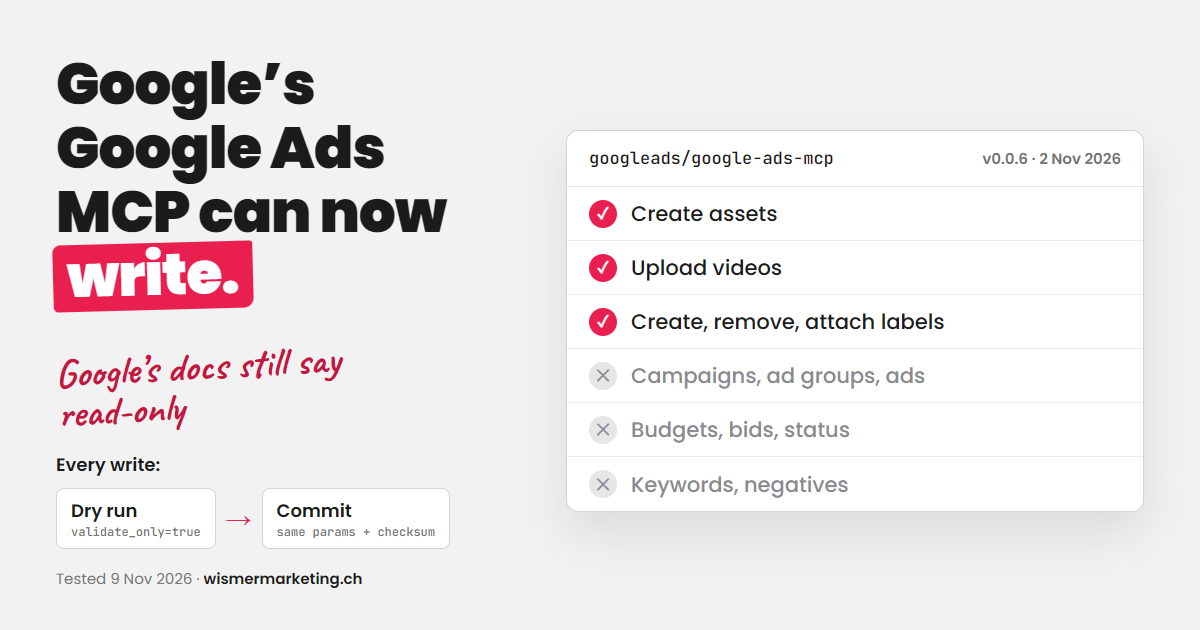
The four new write tools
| Tool (name since v0.0.6) | What it does |
|---|---|
assets_create_asset | Creates an asset in the account’s asset library: text, image, YouTube video, sitelink, callout, structured snippet, other types via extra parameters. |
assets_upload_video_asset | Uploads a video to YouTube through Google Ads, to your channel or a Google-managed one. |
labels_manage_labels | Creates, updates and removes labels. |
labels_manage_label_associations | Attaches labels to or removes them from the account, campaigns, ad groups and keywords. |
The read tools are unchanged: GAQL queries, the list of accessible accounts and field metadata.
How propose-and-confirm works
- The AI calls a write tool. By default
validate_onlyis true: Google validates the change without executing it. - The server returns the planned changes in readable form and a checksum.
- Only a second call with the same parameters,
validate_only=falseand that checksum executes the change. If any parameter differs, the commit fails.
The checksum makes sure that what gets written is exactly what was validated. Whether a human approved it in between, the server cannot check: waiting for the user’s OK is an instruction in the tool description. If you want a hard stop, add your own. I use a Claude Code hook that asks me before every call with validate_only=false.
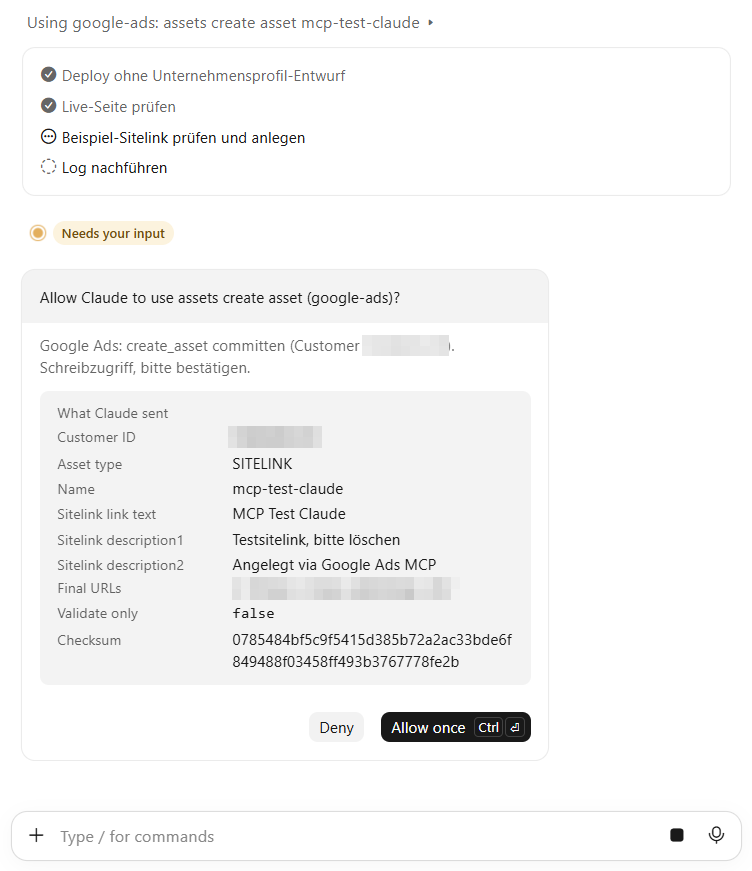
Tested in a live account
On 9 November 2026 I ran the new tools in a client account (with permission), via Claude Code:
| Step | Result |
|---|---|
| Dry run: create label and callout asset | Both validated, changes and checksum returned, nothing written |
| Commit: create label | Label created |
| Read back via GAQL | Label present, status ENABLED, description correct |
| Dry run and commit: remove label | Label removed |
| Read back via GAQL | Status REMOVED |
The callout was never committed. A removed label stays visible in Google Ads with status REMOVED, as with every removed entity.
Later the same day I created a test sitelink the same way. It shows up in the asset library right away, not attached to any campaign:
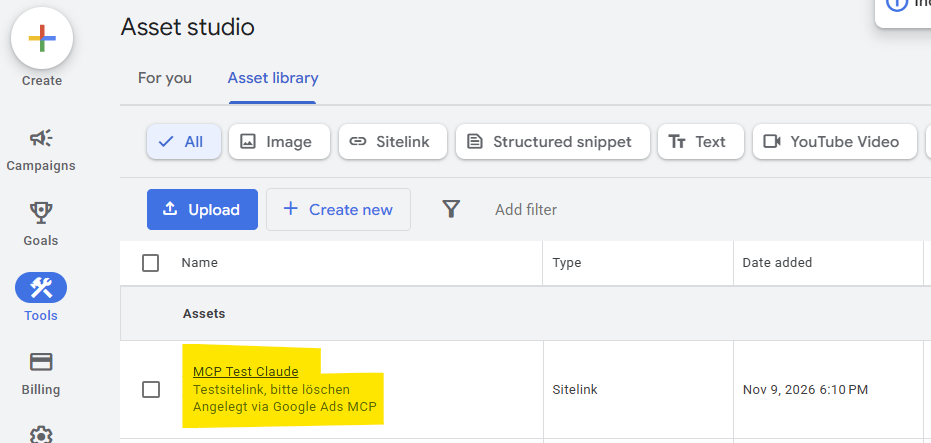
What it still cannot do
- Create or edit campaigns, ad groups or ads.
- Change budgets, bids, bidding strategies or status (pause, enable).
- Add keywords or negative keywords.
- Attach a new asset to a campaign or ad group. Assets only land in the library; I found no tool for the link in v0.0.6.
A community pull request with tools for campaign status, budgets and negative keywords (#137) was closed by its author two minutes after opening (“opened by mistake”).
What to check after updating
- Write tools are on by default. If you only want reporting, use your own
tools_config.yamlwithlabels: falseandassets: falseand pointGOOGLE_ADS_MCP_TOOLS_CONFIGto it. - Tool names changed. Tools are now prefixed with their namespace:
searchbecamesearch_search,list_accessible_customersbecamecustomers_list_accessible_customers,get_resource_metadatabecamemetadata_get_resource_metadata. Permission lists andallowed-toolsin skills that use the old names silently lose access. Two of my skills did. - Add a confirmation gate you control. See above. Also lock which customer IDs the AI may touch per client.
- Update deliberately.
pipx install git+https://github.com/googleads/google-ads-mcp.gitalways pulls the latest code from the main branch. Pin a tag (@v0.0.6) if you want to decide when new write tools arrive.
Timeline
| Date | Change |
|---|---|
| Oct 2025 | Open-source launch announced, read-only |
| 26 May 2026 | Label tools added to the code |
| 3 Jun 2026 | Tools configurable via tools_config.yaml |
| 10 Sep 2026 | v0.0.3: developer token no longer validated at startup |
| 19 Oct 2026 | Propose-and-confirm added to all write tools |
| 2 Nov 2026 | v0.0.6 released: asset and label management with propose-and-confirm |
Dates for 2026 are commit and release dates on GitHub.
Why I still use a script for budgets
For budgets, target CPA and status changes I use a small script on the Google Ads API with the same pattern: dry run, explicit confirmation, read back, change log. Third-party MCP servers cover more of the API, but they hold a token with access to every account under your manager account. For client accounts I keep that token on my own machine.
FAQ
Can Claude change Google Ads budgets through the official MCP server?
No. As of v0.0.6 the server can only create assets, upload videos and manage labels. Budgets, bids and campaign status need the Google Ads API directly or a different server.
Are the write tools enabled by default?
Yes. The bundled tools_config.yaml enables the labels and assets namespaces. Set them to false in your own config to turn them off.
Does the server write without asking?
Not in one step. Every write needs a validated dry run and a second call with the matching checksum. The server cannot verify that a human approved the second call, so add your own confirmation if you need one.
Sources
- googleads/google-ads-mcp, release v0.0.6 (2 November 2026)
- Pull request #139: asset and label management with propose-and-confirm flow
- Google Ads MCP server: developer integration guide (read-only description, checked 9 November 2026)
- Google Ads Developer Blog: Open Source Google Ads API MCP Server (October 2025)
My full setup with GA4, Search Console and Meta Ads is described in the marketing MCP stack for Claude Code (German).